Documentation · Curating
Creating configs
A config names the objects you are willing to expose. That is the whole security model, and it is a file you can review, diff and put through a change process.
An object that is not in the config has no tool, no method and no class in the generated server. It is not hidden at request time — it is absent from the binary.
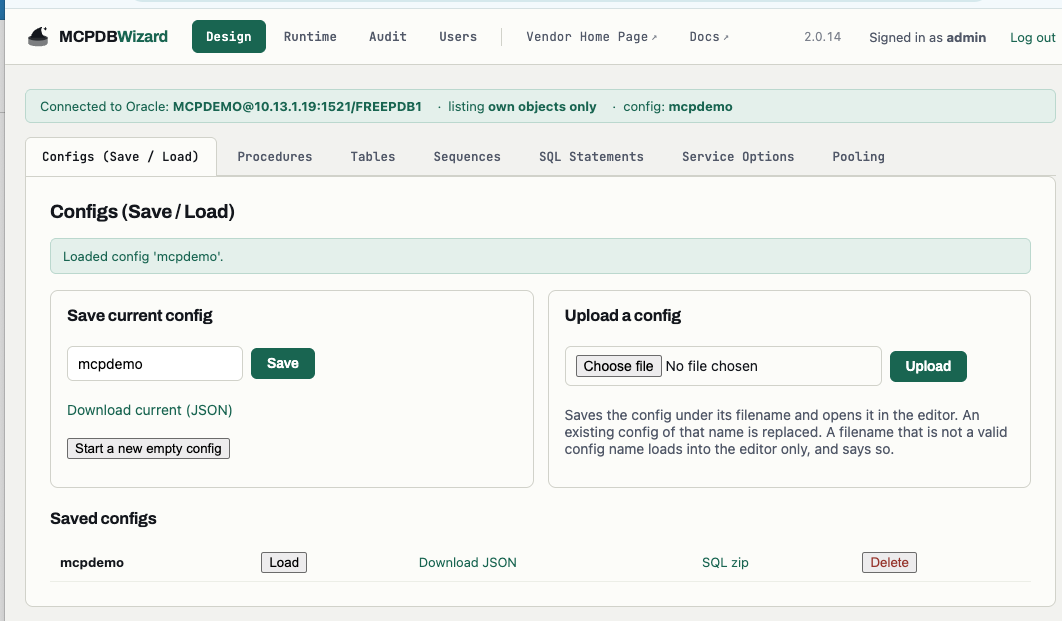
The file
Configs are plain .pb2 properties or .json — the same content either way.
# payroll.pb2
MCP_SERVER=YES
MCP_HTTP_TOKEN=YES

TABLE_USER_0=PAYROLL
TABLE_NAME_0=EMPLOYEE
TABLE_MCP_CRUD_0=R

PROC_USER_0=PAYROLL
PROC_PACKAGE_0=EMPLOYEE_PKG
PROC_NAME_0=GET_BALANCE

SEQUENCE_USER_0=PAYROLL
SEQUENCE_NAME_0=EMPLOYEE_ID

PASS=FROM_ENV_VARIABLE_DB_PASS
A config saved from the console never contains a password — it records the
FROM_ENV_VARIABLE_DB_PASS placeholder, so there is nothing on the volume to leak.
Naming
Config names must be valid Java package names — payroll or com.example.payroll, not
payroll-api. The name is a file, a directory, a path segment in /mcp/<owner>/<config> and the identity
the access matrix grants on, so it is limited to an alphabet all four agree about.
Use more than one
A selected table yields at least four tools, so fifty tables is two hundred before any PL/SQL. If an agent is struggling to choose, that is a curation problem. Make a second config selecting only what that agent needs.
Configs are the unit of curation and of access, so this also narrows what the calling account can reach.
A config can also use Context Pinning to serve one customer per connection: declare a URL
context parameter such as CUSTOMER_NAME, and your PL/SQL reads it with SYS_CONTEXT('MCP', ...)
instead of taking it as an argument the model could change. See Context Pinning.
Descriptions
Every tool gets a generated description carrying its columns or parameters with their Oracle types, and you can replace it with your own. The description is what the model reads when it decides whether to call a tool: say what the call does and when it applies, in plain language. Vague descriptions produce wrong tool choices far more often than bad parameters do.
You write them on Design → Service Options, in the Tools this config exposes panel — one box per tool, with the description that tool publishes today printed underneath it. There is no per-object description page any more; a description is edited beside the text it replaces, so you can see what a model reads now before deciding to change it.
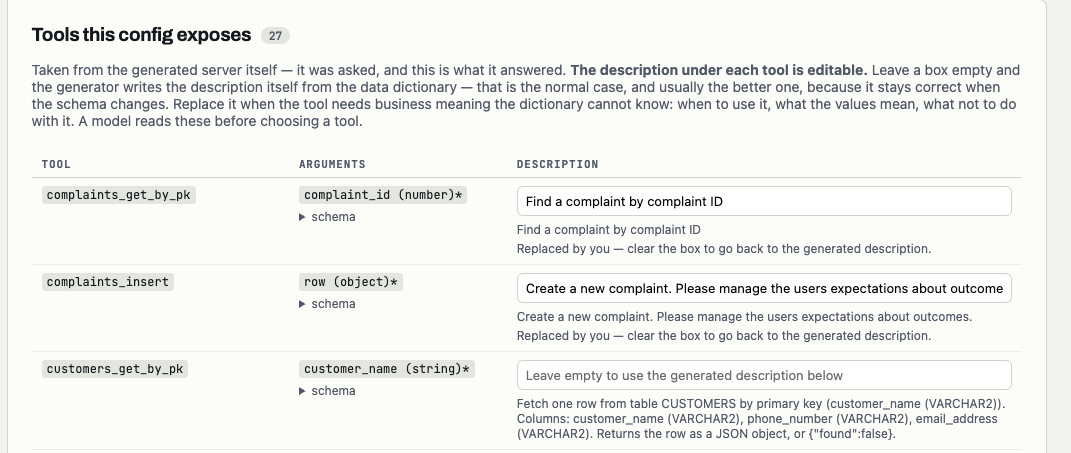
complaints tools carry text somebody wrote; customers_get_by_pk is empty, so it uses the generated description shown beneath — the columns, their Oracle types, and what comes back when there is no row.Leave a box empty and the generator writes the description itself, from the data dictionary. That is the normal case and usually the better one, because it stays correct when the schema changes. Replace it when the tool needs business meaning the dictionary cannot know: when to use it, what the values mean, what not to do with it. Clearing a box you have written in goes back to the generated text.
A config has to be generated once before its descriptions can be edited. The panel is the
generated server’s own answer to tools/list — which tools exist, and what each one currently
says — and none of that is known until a generation has happened. Save the config, start it on the
Runtime page, then come back. Until then the panel says so instead of showing an empty form.
Descriptions are stored in the config file like everything else, so they diff and review with it. Writing one does not change a running server: regenerate for the new text to reach a caller.